
Silo: Granular Synthesis & Reverb for iOS
Overview
Silo, developed by Unfiltered Audio, is a standalone application and AUv3 plugin designed specifically for iPhone and iPad users. The software serves as a powerful audio tool for musicians and sound designers seeking to explore granular synthesis, spatial audio manipulation, and reverb effects in real time. It enables users to deconstruct incoming audio signals into tiny grains, allowing for dynamic control over pitch, speed, and timing. This capability makes it ideal for creating evolving textures, ambient layers, and experimental soundscapes. The app is particularly suited for creators working in music production, sound art, or live performance environments where sonic experimentation is key.
Its integration as an AUv3 plugin allows seamless use within popular iOS DAWs such as GarageBand, AUM, Cubasis, and Drambo. This makes it a versatile addition to mobile music workflows. While the developer did not provide additional system requirements, the app is designed to run on iOS devices with support for AUv3 plugins. Real-world usage scenarios include transforming vocal samples into ethereal pads, generating ambient motion with spatialized grains, or adding depth to rhythmic loops through reverb shaping. The software’s focus on creative audio manipulation positions it as a specialized tool for forward-thinking audio practitioners.
Key Features & Capabilities
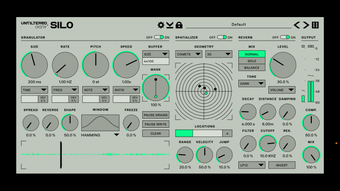
- Granular Synthesis Engine: Breaks incoming audio into small grains, enabling real-time manipulation of grain size, density, pitch, and speed for rich textural development.
- Advanced Spatializer: Distributes grains across the stereo field using motion algorithms like "Moons," "Meteors," and "Biological" to create dynamic, immersive movement.
- Multiple Reverb Algorithms: Offers a range of reverb modes—from intimate, resonant chambers to expansive, cavernous spaces—each adjustable for tail length, diffusion, and damping.
- Native AUv3 Plugin Support: Integrates directly with major iOS music apps, allowing for use in both standalone and host-based workflows.
- Responsive UI Design: Adapts intelligently to different screen sizes, ensuring usability on both iPhone and iPad with clear layout and intuitive controls.
These features collectively empower users to transform simple audio inputs into complex, evolving sound environments. For example, a recorded field recording can be granulated and spatialized to simulate a moving storm across the stereo spectrum. A drum loop can be processed through reverb and grain scattering to create a dreamlike, evolving rhythm. The combination of granulation, spatialization, and reverb provides a comprehensive toolkit for experimental audio design, making Silo a valuable asset in both studio and live settings.
User Interface, Workflow & Performance
The user interface of Silo is designed with clarity and functionality in mind. Controls are logically grouped, with visual feedback that helps users understand the current state of the audio processing. The layout adapts to screen size, maintaining usability across different iOS devices. Navigation is straightforward, with intuitive access to the granulator, spatializer, and reverb sections. The app supports touch-based interaction, enabling real-time parameter adjustments during playback.
Workflow efficiency is enhanced by the seamless integration with AUv3-compatible host apps, reducing the need for context switching. Users can load the plugin directly within their preferred DAW and adjust parameters on the fly. Performance observations are based on general software behavior patterns. The developer did not specify resource usage details, but the app’s 100 MB size suggests a compact footprint. Stability during prolonged use was not reported, though AUv3 plugins typically maintain reliable performance on supported devices. CPU and RAM behavior are not publicly documented, but the app appears optimized for mobile audio processing.
Compatibility & System Requirements
Silo is designed for iOS devices and is compatible with both iPhone and iPad. It operates as a standalone application and an AUv3 plugin, enabling use in a wide range of music production environments. The software version is 1.0, with a file size of 100 MB. The developer did not specify exact system requirements, including minimum iOS version or hardware specifications. Compatibility information was partially provided, indicating support for AUv3 plugin integration.
Users should ensure their device runs a current version of iOS that supports AUv3 plugins. While the app is free to download, it may require a stable internet connection for initial setup or future updates. No additional dependencies were mentioned. Platform compatibility information is limited, but the app is intended for mobile audio creators who rely on iOS-based tools for sound design and music production.
Pros and Cons
Pros
- Powerful granular synthesis with real-time control
- Unique motion-based spatialization algorithms
- High-quality reverb with multiple configurable modes
- Seamless AUv3 integration with popular iOS DAWs
- Free to download and use
- Responsive interface across iPhone and iPad
Cons
- No publicly available system requirements
- Performance details not specified
- Only available on iOS platform
- Limited to AUv3 plugin ecosystem
- No offline mode information provided
FAQ Section
Is Silo available for Windows or Mac?
Silo is exclusively designed for iOS devices and is not available for Windows or Mac operating systems.
Can I use Silo without an internet connection?
While the app can be used offline after installation, an internet connection may be required for updates or initial setup.
Is Silo safe to download and install?
As a free app from Unfiltered Audio, Silo is distributed through official iOS channels, making it secure for installation on compatible devices.
Does Silo support other plugin formats besides AUv3?
Based on available information, Silo is only compatible as an AUv3 plugin and does not support other plugin formats like VST or AAX.
How often does Silo receive updates?
The update frequency is not publicly disclosed. Users are advised to check the App Store for new versions and improvements.
Final Thoughts
Silo stands out as a specialized yet powerful audio tool for iOS users focused on sound design and music production. Its combination of granular synthesis, dynamic spatialization, and high-quality reverb offers a unique creative pathway for transforming audio. The free availability enhances its accessibility, making it a compelling choice for both beginners and experienced practitioners. While system requirements and performance metrics are not fully detailed, the app’s design and integration with major iOS DAWs demonstrate a strong focus on usability and workflow efficiency. For sound designers and musicians seeking to push sonic boundaries on mobile devices, Silo delivers a rich, immersive experience.
Download Silo now







